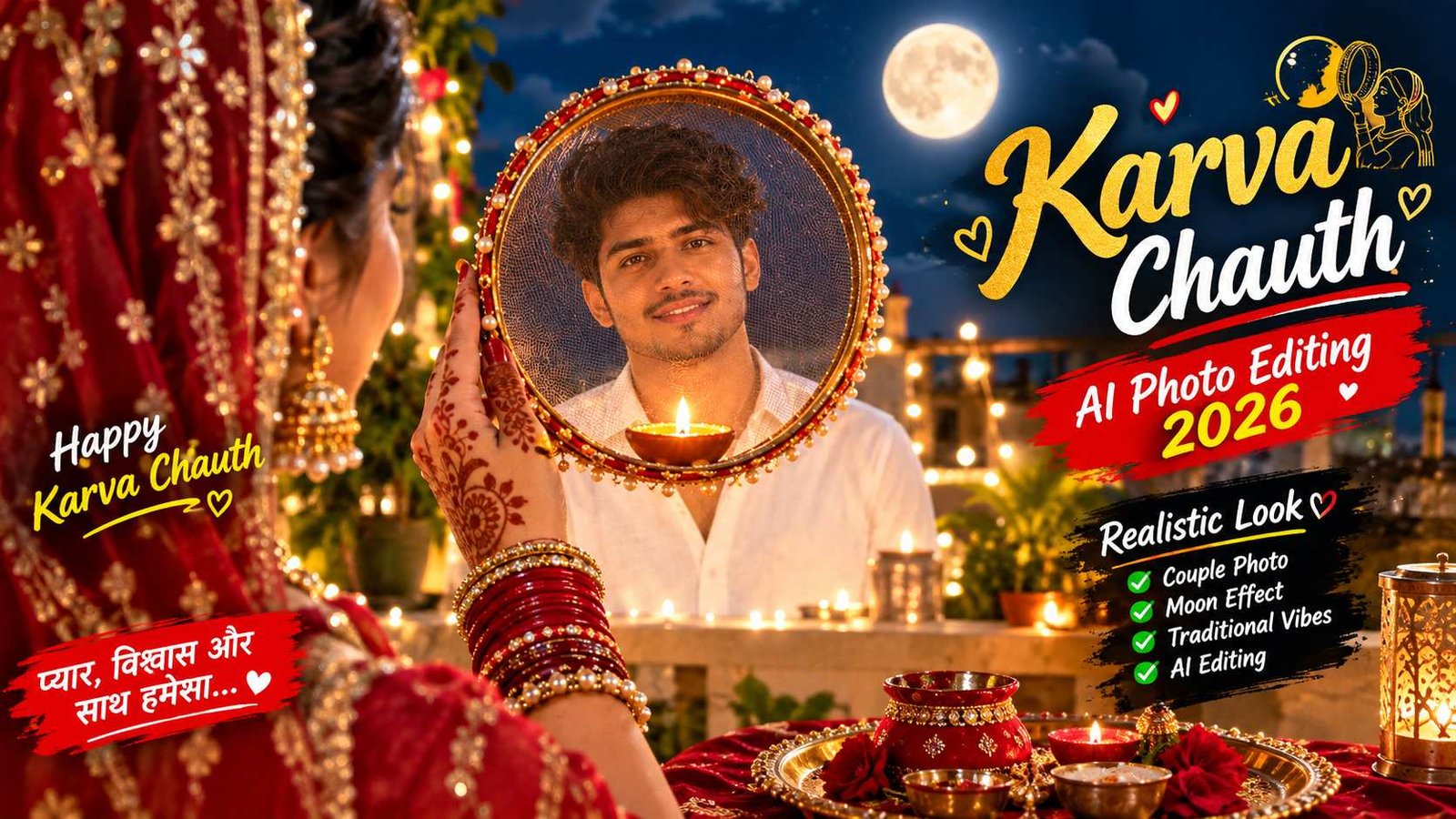
Create Cinematic Karva Chauth Photo From ChatGPT or Gemini | Realistic Karva Chauth Photo Prompt
Karva Chauth Indian culture ka ek behad pavitra, prem aur samarpan se bhara parv hai. Is din suhagan mahilayein apne pati ki deerghayu ke liye din bhar nirjala vrat rakhti hain aur raat ko chhalni (sieve) se chaand aur fir apne pati ka deedar karke vrat poora karti hain. Aaj ke digital zamane mein har couple is emotional aur cinematic pal ko capture karke ek everlasting digital memory banana chahta hai jise wo Instagram, Facebook ya WhatsApp par confidently share kar sakein.
Lekin har kisi ke paas professional lighting set, 85mm portrait lenses ya rooftop cinematic setup arrange karne ka time nahi hota. Yahi wajah hai ki generative artificial intelligence aaj visual storytelling ko naye mukaam par le ja chuka hai. ChatGPT Plus (DALL-E 3) aur Google Gemini jaise powerful multimodal engines ka use karke aap bilkul 8K ultra-detailed, Bollywood poster-level Karva Chauth portraits create kar sakte hain.
Agar aap chahte hain ki aapki photo dekhkar koi yeh na keh sake ki yeh AI generated hai, balki aisa lage ki kisi top-tier film cinematographer ne terrace par light aur emotion ka perfect frame record kiya hai, toh yeh ultimate beginner-friendly guide bilkul aapke liye ready ki gayi hai.
Social Media Par Karva Chauth AI Portraits Ka Zabardast Trend
Pichhle kuch samay se festival photography mein ek revolutionary badlav dekha gaya hai. Pehle jahan simple mobile selfies upload hoti thi, wahin ab social media algorithms aesthetic visual storytelling aur cinematic depth wali images ko sabse zyada viral reach de rahe hain.
- Emotional POV Engagement: Traditional photos ke mukable over-the-shoulder perspective audience ko directly scene ke andar le jata hai, jisse viewer visual se emotionally connect hota hai.
- Aesthetic Festive Colour Palette: Deep dark navy sky, full glowing moon, sparkling stars aur red bridal traditional look milkar ek aisa visual contrast banate hain jo Instagram feeds par scrolling thumbs ko instantly rok deta hai.
- Viral Reel & Story Format: Vertical 9:16 aspect ratio smartphone screen ko edge-to-edge cover karta hai, jisse wallpaper-quality visuals directly engagement aur saves attract karte hain.
Yeh trend ab sirf normal users tak seemit nahi hai, balki lifestyle influencers aur digital creators bhi is technique ka use karke trending festive posts drop kar rahe hain.
Cinematic Photo Generate Karne Ke Liye Zaroori Requirements
AI se accurate aur ultra-realistic photo banane ke liye aapko kisi heavy software ki zaroorat nahi hai, bas kuch basic assets aur tools pehle se taiyar rakhne hote hain:
- High-Resolution Reference Photo: Ek aisi photo jisme subject (husband/male) ka face seedha camera ki taraf ho, chehre par proper light ho, aur face par koi heavy shadow ya sunglasses na ho. Yeh AI ko accurate face mapping mein madad karta hai.
- Active AI Tool Account: ChatGPT Plus (DALL-E 3 access ke sath) ya fir updated Google Gemini (Gemini Advanced/App).
- Official Website Ka Exact Prompt: AI ko precise framing, camera millimeter aur light source batane ke liye optimized text prompt ki zaroorat hoti hai.
- Basic Photo Enhancer App (Optional): Free Adobe Lightroom Mobile ya Snapseed app, jisse final render par professional film touch diya ja sake.
Hamari Official Website Se Trending Karva Chauth Prompt Copy Karein
Sabse pehle aapko testing aur color-balancing pass kiya hua master prompt copy karna hoga.
- Hamari official website [YOUR WEBSITE URL HERE] par visit karein.
- AI Prompts section mein jaakar “Realistic Karva Chauth AI Photo Prompt” ko select karein.
- Wahan diye gaye direct copy button par tap karke prompt ko apne clipboard mein save kar lijiye.
Aapki convenience ke liye prompt ko humne special visual box mein neeche format kar diya hai taaki aap easily ise pehchan sakein aur copy kar sakein:
📌 COPY THIS MASTER PROMPT:
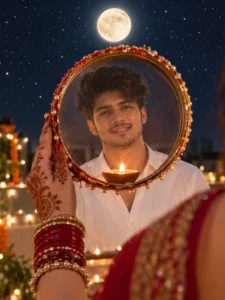
An intimate, close-up, over-the-shoulder POV shot from behind a woman's right shoulder, looking at her husband through a circular sieve (chhalni) during Karwa Chauth at night. Only the back of her shoulder, draped in a richly embroidered red saree, and her right hand are visible on the right and bottom; her face is completely unseen. Her henna-patterned hand, adorned with red and gold bangles, holds up the decorated sieve on the left. In sharp focus through the sieve’s mesh, the young man’s face is clearly visible as he smiles warmly in a white shirt. Resting on the bottom edge of the sieve, inside the mesh, is a small glowing diya. Above the sieve in the dark sky, a glowing full moon is positioned directly over the man’s head. The deep night sky is filled with countless twinkling stars, creating a magical backdrop. Rooftop string lights and candles blur into soft bokeh. Real photograph, high-detail, shot on an 85mm lens at f/1.4 to keep the foreground shoulder and hand natural, while focusing entirely on the man’s face and the moonlit, starry night in 9:16.
ChatGPT (DALL-E 3) Se Realistic Photo Banane Ka Step-by-Step Tarika
ChatGPT ka text-to-image engine complex lens details aur mood lighting ko accurately interpret karta hai. Follow karein yeh practical steps:
- ChatGPT Open Karein: Apne mobile app ya web browser par ChatGPT account open karein.
- Reference Image Attach Karein: Message box ke left side par bane + (Attachment) icon par click karein aur apni gallery se clear face photo upload karein.
- Master Prompt Paste Karein: Hamari official website [YOUR WEBSITE URL HERE] se copy kiya gaya prompt box mein paste kar dein.
- Custom Command Add Karein: Prompt ke baad bina space chhode type karein: “Please closely retain the facial bone structure, skin complexion, and smile from the uploaded reference photo for the man seen through the sieve.”
- Generate & Save: Send icon par tap karein. Lagbhag 30–40 seconds mein aapka hyper-detailed 9:16 vertical render taiyar ho jayega. Image par tap karke use full resolution mein download karein.
Google Gemini Se High-Detail Karva Chauth Photo Create Karne Ka Asan Tarika
Google Gemini ka multimodal architecture fast image generation aur skin texture realness ke liye popular hai:
- Gemini App Open Karein: Apne phone par Google Gemini app launch karein ya desktop par gemini.google.com open karein.
- Photo Upload Karein: Chat console mein bane Gallery/Image icon par click karke reference photo upload karein.
- Prompt Enter Karein: Upar diya gaya master prompt input box mein paste kar dein.
- Realism Tag Apply Karein: Prompt ke aakhir mein bas itna likhein: “Ensure realistic raw camera rendering with natural skin pores, realistic cloth embroidery, and zero AI over-smoothing or plastic cartoon finish.”
- Export Karein: Gemini image process karega. Output aane ke baad download icon par click karke image ko direct apni mobile gallery mein save kar lein.
Prompt Ki Deep Technical Understanding Aur Composition Breakdown
Aisa output pane ke liye AI ko visual physics samajhana zaroori hota hai, jo is prompt ke structure mein build kiya gaya hai:
- Over-the-Shoulder & Hand Occlusion: Mahila ka chehra na dikhakar sirf unka right shoulder, embroidered red saree, aur red-gold choodiyon ke sath mehndi wala haath frame ke right aur bottom par rakha gaya hai, jisse visual depth realistic banti hai.
- Framing Within Frame: Chhalni (sieve) ek natural frame ka kaam karti hai, jiske mesh ke andar pati ka smiling face naturally lock ho jata hai.
- Dual Light Source Dynamics: Bottom par rakhe diya ki 3000K warm yellow flame face aur mesh par warm glow daalti hai, jabki 5600K cool full moon aur twinkling stars night sky ko royal depth dete hain.
- Cinematic Optical Blur (85mm f/1.4): Yeh camera specific tag AI ko force karta hai ki wo background mein terrace par lagi hui string lights aur deep night sky ko soft round bokeh balls mein convert kare, bina face ki sharpness ko lose kiye.
Bonus Tip – Professional Editor Ka 2-Minute Post-Processing Secret
AI jo image banata hai, usme kabhi-kabhi skin thodi zyada smooth ya plastic lag sakti hai. Ek video aur photo editor ke roop mein main hamesha yeh 3 quick adjustments karta hoon:
- Lightroom Mobile Grain Addition: Apni downloaded photo ko free Lightroom Mobile app mein open karein. Effects section mein jaakar Grain ko +12 aur Roughness ko +50 set karein. Real cinema cameras mein hamesha micro-grain hota hai; yeh chhota sa step AI look ko 100% natural real photo mein badal deta hai.
- Highlights & Dehaze Balance: Light panel mein jaakar Highlights ko -10 karein taaki diya ki flame over-exposed na lage, aur Dehaze ko +6 karein taaki chaand aur taaron ka contrast ekdum crisp ho jaye.
- Warm Glow Enhancement: Selective brush tool se pati ke chehre aur diya ke aaspas Color Temperature ko halka sa warm (+4) kar dein, jisse diya ka practical lighting effect aur zyada realistic lage.
Conclusion
Artificial intelligence aur creative prompt engineering ne visual storytelling ko itna aasan bana diya hai ki ab koi bhi person kuch hi clicks mein studio-grade portraits ready kar sakta hai. Hamari official website rayedits.in] par visit karke is trending Karva Chauth prompt ko copy karein, ChatGPT ya Gemini par apply karein aur is festive season par apne love aur culture ko ek breathtaking cinematic visual mein convert karein. Regular practice karein aur alag-alag creative camera angles ke sath naye festive experiments karte rahein!