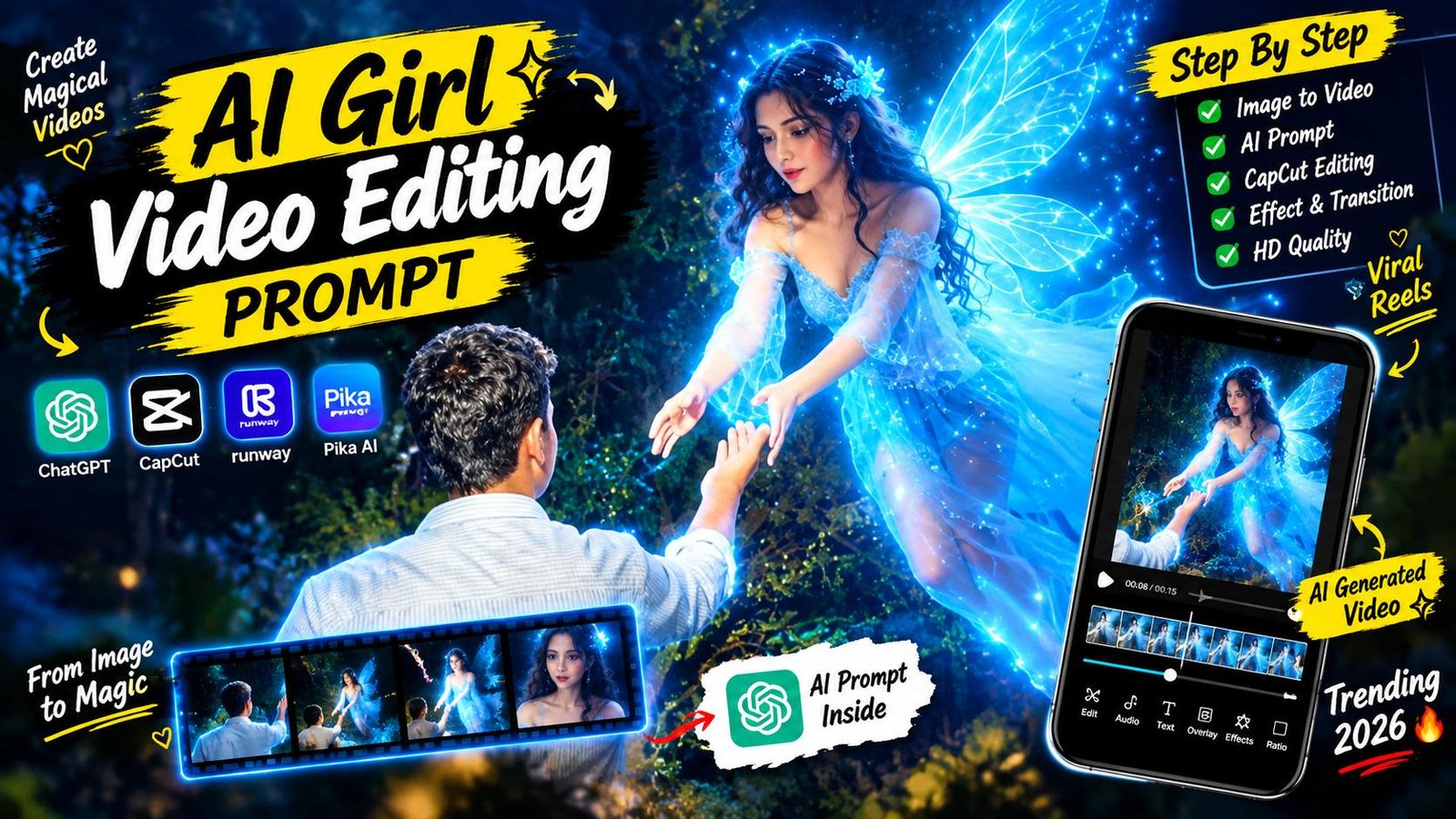
Instagram Reels par visuals ka game har din evolve ho raha hai, lekin is waqt ek unique concept sabse zyada trend kar raha hai: AI Girl Video Editing Prompt (Instagram Viral Prompt: create your girlfriend). Is trend mein creators apni simple walking ya outdoor photograph ko ek cinematic slow-motion video mein convert kar rahe hain, jahan frame mein achanak ek adult Indian character running movement ke sath judti hui dikhayi deti hai. Sabse hairatangez baat ye hai ki video ka lighting, camera perspective aur environment physics itne real lagte hain ki viewer pehli nazar mein ye pehchan hi nahi pata ki ye computer-generated visual hai.
Is tarah ke viral content ki sabse badi taqat iska high visual retention score hai. Jab viewers ko frame mein authentic interaction aur cinematic slow-motion visuals dikhte hain, toh wo reel ko loop par dekhte hain. Is detailed beginner-friendly guide mein, hum is exact trend ko create karne ka pura end-to-end workflow samjhenge—official website se prompt lene se lekar photo generation, video rendering aur post-production colour grading tak.
The Viral Trend: Ye Video Format Itna Popular Kyun Hai?
Social media algorithms hamesha un videos ko promote karte hain jo organic storytelling par focus karti hain. Is trend ke viral hone ke piche teen primary visual factors hain:
- Identity Preservation: Is workflow mein creator ka chehra, posture, kapde aur original setting bilkul nahi badalti. AI sirf ek dynamic running subject seamlessly inject karta hai.
- Cinematic Physics: Static images ke mukable moving saree fabric, natural hair swing aur realistic ground shadows audience ko real film footage jaisa feel deti hain.
- Curiosity Element: Viewers comment section mein ye discuss karne lagte hain ki video shoot kaise hui, jisse engagement rate exponential badhta hai.
Step 1: Official Source Se Prompts Copy Karna
Realistic output pane ke liye sabse basic aur important rule hai accurate prompt structure. Choti si mistake bhi subject ko distort kar sakti hai, isliye recommended yahi hai ki verified prompt ka hi upyog karein.
- Apne mobile ya PC browser mein official website rayedits.in par visit karein.
- Search bar mein “AI Girl Video Editing Prompt” search karein ya direct trending AI section mein jayein.
- Post ke andar aapko do alag-alag prompts milenge:
- ChatGPT Photo Composite Prompt
- Google AI Video Motion Prompt
- Dono prompts ko wahan se copy karke apne smartphone ke safe notepad ya memo app mein paste kar lein taaki working ke waqt smooth workflow bana rahe.
Step 2: ChatGPT Par Base Photo Create Karna
Video banne se pehle ek solid, realistic photo base ka hona lazmi hai. Ye step ensure karega ki aapka scene visual perspective ke sath 100% match kare.
1. Photo Selection aur Uploading
- Apni gallery se ek clear, outdoor photograph chunein jismein aap aage ki taraf chal rahe hon (back-facing ya side-angle shot sabse natural composition deta hai).
- Background mein khet, rural road, trees ya natural landscape ho toh AI lighting aur depth of field ko visually enhance kar pata hai.
- ChatGPT open karein, image upload icon par tap karein aur apni chuni hui photo attach karein.
2. Photo Prompt Execution
Photo attach karne ke baad, rayedits.in se copy kiya gaya pehla prompt text box mein paste karein:
Photo Prompt:
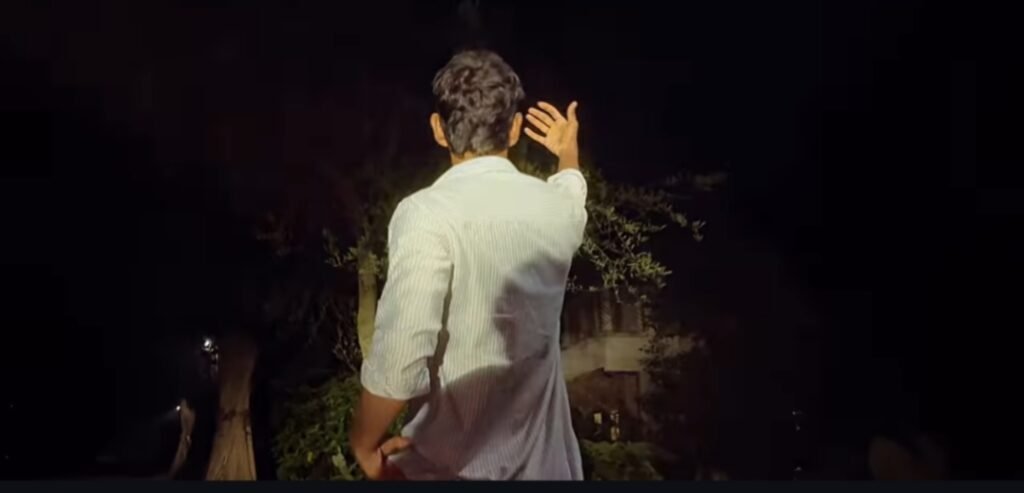
Use my uploaded image as the ORIGINAL BASE IMAGE IMPORTANT: DO NOT CHANGE THE ORIGINAL IMAGE. Keep the uploaded male character, his exact face, Identity, hairstyle, hairline, skin tone, clothes, body, pose, position, background, framing and original environment EXACTLY as they are. Do NOT regenerate or replace the male. Do NOT modify his face or body. Do NOT change his clothes NOT change the original background. Do NOT change the camera angle or composition. ONLY ADD the fairy and magical elements to the existing image. FAIRY: Add a beautiful young adult female fairy naturally into the existing scene, positioned in front of the male character in the same composition and perspective as the provided fairy reference. The fairy should have long flowing dark hair, an elegant flowing translucent BLUE-WHITE glowing dress, large delicate translucent butterfly-ke wings, a bright blue-white magical glow, realistic human appearance, natural facial features, realistic skin and hair, and a photorealistic live-action appearance. The fairy should be floating naturally in the air and facing the male character. POSE The fairy should extend one hand toward the male character, as if gently holding or touching his raised hand. Match the fairy's position, scale, body angle, hand position and overall pose to the reference image. BUTTERFLIES: Add several small glowing butterflies around the fairy. The butterflies should be the SAME BLUE/BLUE-WHITE glowing color as the fairy's magical lighting and wings. Make the butterflies look realistic and magical, with subtle blue-white luminous wings and soft glowing particles around them. Some butterflies can be closer to the fairy white a few can float naturally around the surrounding area. Do not make the butterflies oversized or cartoon-like. LIGHTING: The fairy and butterflies should emit a realistic blue-white magical glow. The glow should naturally blend into the ORIGINAL uploaded image without changing the original scene. Add subtle blue light spill only where physically appropriate, especially around the fairy and nearby environment. Do not recolor or replace the entire original image. COMPOSITION: Keep the original male exactly where he is. Keep the original background exactly where it is. Only integrate the fairy into the scene naturally. The final result should look like the ORIGINAL photograph was captured with a glowing fairy and blue glowing butterflies physically present in the scene. REALISM: Ultra-photorealistic. Real human skin texture. Real hair strands. Realistic transparent wings. Realistic fabric. Natural shadows. Natural atmospheric light. Realistic depth of field. Cinematic night photography. Natural lens bloom. Realistic blue light interaction. The fairy must look like a real person physically present in the scene, NOT CGI, NOT 3D, NOT cartoon, NOT anime. STRICT NEGATIVE INSTRUCTIONS: Do NOT change the uploaded image. Do NOT change the male's face. Do NOT change the male's body. Do NOT change his clothes. Do NOT change his pose. Do NOT change the background. Do NOT replace any existing objects. Do NOT add another human. Do NOT create extra limbs or fingers. Do NOT distort the original image. ONLY ADD: 1. One realistic glowing blue-white fairy. 2. Realistic translucent fairy wings. 3. Blue-white glowing butterflies. 4. Subtle magical blue particles around the fairy. NO TEXT, NO WATERMARK. NO LOGO NO CAPTIONS. FINAL RESULT: The original uploaded image must remain visually unchanged except for the addition of the single realistic blue-white glowing fairy, realistic translucent wings, blue-white glowing butterflies and subtle magical blue particles.
Step 3: Google AI Flow Par Video Generate Karna
Ab download ki gayi image ko ek smooth, cinematic slow-motion footage mein convert karne ki baari hai.
1. Image-to-Video Setup
- Apne browser mein Google AI video generation platform open karein.
- Wahan Image-to-Video ya First-Frame Reference upload option par click karein.
- Step 2 mein ChatGPT se download ki hui new photo ko upload karein.
2. Video Prompt Execution
Image upload ho jane ke baad input field mein official website se copy kiya gaya video prompt enter karein:
Video Prompt:
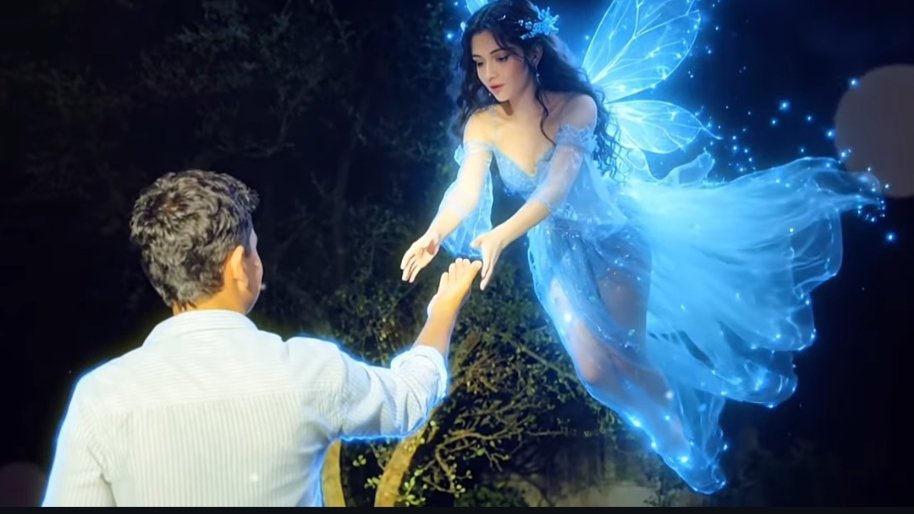
Use my uploaded image as the ORIGINAL BASE IMAGE. IMPORTANT: DO NOT CHANGE THE ORIGINAL IMAGE. Keep the uploaded male character, his exact face, identity, hairstyle, hairline, skin tone, clothes, body, pose, position, background, framing and original environment EXACTLY as they are. Do NOT regenerate or replace the male. Do NOT modify his face or body. Do NOT change his clothes. Do NOT change the original background. Do NOT change the camera angle or composition. ONLY ADD the fairy and magical elements to the existing image. FAIRY: Add a beautiful young adult female fairy naturally into the existing scene, positioned in front of the male character in the same composition and perspective as the provided fairy reference. The fairy should have long flowing dark hair, an elegant flowing translucent BLUE-WHITE glowing dress, large delicate translucent butterfly-like wings, a bright blue-white magical glow, realistic human appearance, natural facial features, realistic skin and hair, and a photorealistic live-action appearance. The fairy should be floating naturally in the air and facing the male character. POSE: The fairy should extend one hand toward the male character, as if gently holding or touching his raised hand. Match the fairy's position, scale, body angle, hand position and overall pose to the reference image BUTTERFLIES: Add several small glowing butterflies around the fairy. The butterflies should be the SAME BLUE/BLUE-WHITE glowing color as the fairy's magical lighting and wings. Make the butterflies look realistic and magical, with subtle blue-white luminous wings and soft glowing particles around them. Some butterflies can be closer to the fairy while a few can float naturally around the surrounding area. Do not make the butterflies oversized or cartoon-like. LIGHTING: The fairy and butterflies should emit a realistic blue-white magical glow. The glow should naturally blend into the ORIGINAL uploaded image without changing the original scene. Add subtle blue light spill only where physically appropriate, especially around the fairy and nearby environment. Do not recolor or replace the entire original image. COMPOSITION: Keep the original male exactly where he is. Keep the original background exactly where it is. Only integrate the fairy into the scene naturally. The final result should look like the ORIGINAL photograph was captured with a real glowing fairy and blue glowing butterflies physically present in the scene. REALISM: Ultra-photorealistic. Real human skin texture. Real hair strands. Realistic transparent wings. Realistic fabric. Natural shadows. Natural atmospheric light. Realistic depth of field. Cinematic night photography. Natural lens bloom. Realistic blue light interaction. The fairy must look like a real person physically present in the scene, NOT CGI, NOT 3D, NOT cartoon, NOT anime. STRICT NEGATIVE INSTRUCTIONS: Do NOT change the uploaded image. Do NOT change the male's face. Do NOT change the male's body. Do NOT change his clothes. Do NOT change his pose. Do NOT change the background. Do NOT replace any existing objects. Do NOT add another human. Do NOT create extra limbs or fingers. Do NOT distort the original image. ONLY ADD: 1. One realistic glowing blue-white fairy. 2. Realistic translucent fairy wings. 3. Blue-white glowing butterflies. 4. Subtle magical blue particles around the fairy. NO TEXT, NO WATERMARK. NO LOGO, NO CAPTIONS. FINAL RESULT: The original uploaded image must remain visually unchanged except for the addition of ONE realistic blue-white glowing fairy, her realistic translucent wings, several small blue-white glowing butterflies, and subtle magical blue particles. Preserve every original pixel, object, person, facial feature, clothing detail, background element, camera angle, framing. lighting and composition wherever the fairy and magical elements are not being added. The added fairy must be naturally integrated into the existing scene with correct perspective, scale, depth, shadows, reflections, lighting and atmospheric interaction. Do not regenerate, repaint, enhance, beautify, retouch or reinterpret any part of the original male or background. The ONLY modification allowed is the addition of the specified fairy and magical elements.
Step 4: 4K Upscaling aur Cinematic Colour Grading
Seedha AI raw video upload karne se reach compromise ho sakti hai. Ek professional creator hamesha post-production editing ka sahara leta hai taaki video naturally polished dikhe.
1. Speed Ramping aur Fluid Motion
- Generated video clip ko apne mobile editing software (CapCut ya VN Editor) mein import karein.
- Video layer par click karke Speed Curve select karein. Clip ke opening 2 seconds ko standard 1.0x par rakhein, aur jaise hi background movement noticeable ho, speed ko 0.4x slow-mo par ramp karein.
- Smooth slow-motion ke liye Optical Flow Smoothness activate karein taaki frame drop na ho.
2. Manual Colour Correction Settings
AI videos ke digital look ko natural film texture mein convert karne ke liye adjustment tool mein ye specific adjustments apply karein:
- Exposure: -4%
- Contrast: +7%
- Highlights: -12% (sky aur light spill balance karne ke liye)
- Shadows: +4%
- Sharpening: +14%
- Film Grain: +6% to +8% (ye digital smoothness ko organic DSLR look deta hai)
3. Audio Layering aur 4K Export
- Visuals tabhi impact create karte hain jab audio synchronised ho. Background mein subtle wind ambience, soft grass footsteps SFX aur ek viral slow-reverb track add karein.
- Final export settings ko hamesha Resolution: 4K (2160p), Frame Rate: 60 FPS, aur Bitrate: High par set karein taaki Instagram compression ke baad bhi video crisp aur sharp rahe.
Smart Editing Hack: Seamless Edge Blending
Aksar AI-generated videos mein character ke borders par halki digital outline notice ho sakti hai. Isse bachne ke liye editing app mein video ke upar ek soft Directional Blur (Intensity 2-3%) ya subtle Vignette (+5) apply karein. Ye visual elements frame ke edges ko background ke sath flawlessly melt kar dete hain, jisse audience ke liye visual flaw pakad pana namumkin ho jata hai.
Conclusion
Instagram par consistent viral growth achieve karne ke liye trends ko sirf observe karna kaafi nahi hota, unhe sahi workflow ke sath execute karna padta hai. Rayedits.in se verified prompts lekar, ChatGPT aur Google AI generation tools ke zariye aap bina kisi professional camera crew ke feature-film level reels create kar sakte hain. Pacing, colour tone aur sound design par focus banaye rakhein, alag-alag outdoor settings ke sath experiment karein, aur apni storytelling skills ko regular practice se upgrade karte rahein.