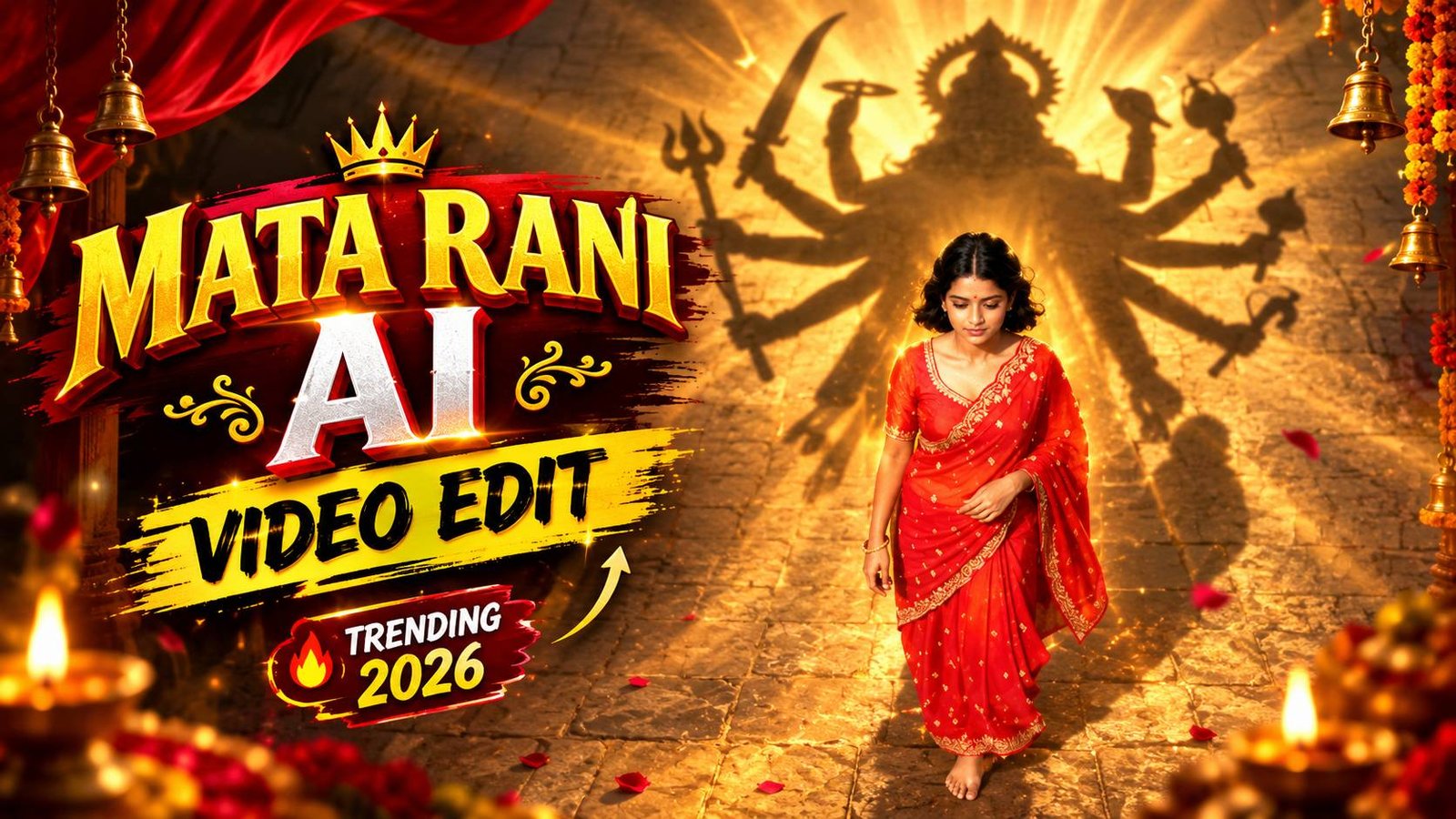
Mata Rani AI Video Editing Tutorial 2026
Social media platforms jaise Instagram Reels aur YouTube Shorts par aaj kal devotional aur spiritual content kaafi tezi se viral ho raha hai. Agar aap bhi trending concepts par kaam karke million views gain karna chahte hain, toh Mata Rani AI Video Editing 2026 aapke liye sabse powerful aur creative trend ban chuka hai.
Is tarah ke videos dekhne mein behad cinematic, emotional aur divine feel dete hain. Inme ek real person normal walk karta dikhta hai aur road par piche bhagwan ya devi maa ki ek gigantic divine shadow nazar aati hai. Aaj is step-by-step complete guide mein hum jaanenge ki kaise aap free modern AI tools ka use karke is pure viral concept ko aasani se create kar sakte hain.
Why Mata Rani Shadow Videos Are Trending in 2026
Short video algorithms hamesha visual hook aur emotional retention par kaam karte hain. Devotional concepts naturally audiences ke andar shraddha aur curiosity generate karte hain, jisse log video ko pura watch karte hain aur share bhi karte hain.
Drone perspective ya bird’s-eye view shot ke sath road par aane wali divine shadow ek cinematic illusion create karti hai. Aisi high-retention videos ko algorithm organically push karta hai, jisse naye content creators ke accounts par bhi organic reach aur followers kaafi tezi se grow hone lagte hain.
Complete Step-by-Step Workflow: Create Viral Mata Rani AI Video
Ek ultra-realistic divine shadow video banane ke liye aapko heavy computer hardware ya complicated 3D animation seekhne ki bilkul zaroorat nahi hai. Pure process ko do simple steps mein divide kiya gaya hai: pehle reference image generation aur dusra us image ko cinematic AI video mein convert karna.
Niche diye gaye har step ko dhyan se follow karein taaki aapka output bina kisi glitch ya distortion ke perfectly render ho sake.
Step 1: Base Image Generate Karein (Using ChatGPT)
Sabse pehle aapko ek high-resolution reference photo create karni hogi jisme subject ka overhead bird’s-eye drone shot ho aur road par Maa Kali ya Mata Rani ki shadow accurately placed ho.
- Upload Your Photo: Sabse pehle ChatGPT open karein aur apni ek clean, well-lit normal standing photo upload karein.
- Give the Transformation Prompt: Chatbot ko clearly instruct karein: “Convert my uploaded photo into a straight-down bird’s-eye drone perspective shot walking on an outdoor road. Behind me on the road, add a giant, detailed divine shadow of Mata Rani / Maa Kali with multiple arms, majestic crown, trident, and sword, perfectly matching the sunlight angle.”
- Verify Subject Details: Ensure karein ki subject ka attire traditional (jaise red salwar suit ya kurta) ho taaki divine aura natural lage.
- Download High Resolution Image: Jab ChatGPT aapko photorealistic drone shot render karke de de, toh us final image ko full resolution mein apne device mein save kar lein.
Step 2: Image to Video Transformation (Using Google AI Flow)
Ab hum generate ki hui base photo ko ek dynamic, motion-rich vertical reel video mein tabdeel karenge using Google AI Flow.
- Open Google AI Flow: Sabse pehle Google AI Flow ki official website par visit karein aur apne account se sign in karein.
- Upload Reference Frame: ChatGPT se download ki hui Mata Rani shadow wali photo ko image input section mein upload karein aur isse starting frame set karein.
- Set Aspect Ratio: Aspect ratio ko 9:16 vertical select karein, jo reels aur shorts ke liye standard format hai.
- Paste Official Prompt: Niche diye gaye prompt ko copy karke directly prompt box mein paste kar dein. Yeh prompt aap hamari official website rayedits.in se bhi directly copy kar sakte hain:
Google AI Flow Video Prompt:
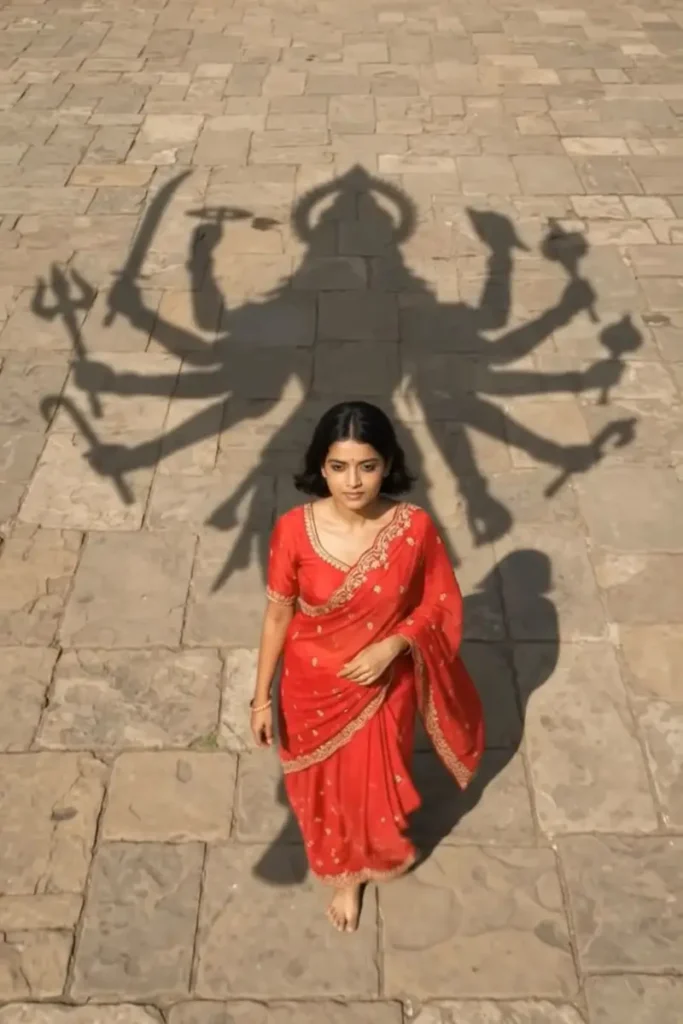
Create a cinematic, ultra-realistic 9:16 vertical video using my uploaded image as the starting frame and identity reference. SCENE & MOVEMENT: A young Indian woman wearing a beautiful bright red salwar suit with golden embroidery and a flowing red dupatta walks slowly forward along a sunlit rural dirt pathway. Her long black hair and dupatta move gently with the breeze. The camera follows her from an extremely high, straight-down bird’s-eye drone perspective. Maintain the same overhead angle and full-body composition throughout the video. As she walks forward, the gigantic divine shadow of Maa Kali follows directly behind her across the dusty ground. Maa Kali’s shadow has a majestic crown, flowing hair, multiple arms, a trident, and a sword. The shadow moves naturally in sync with the sunlight and the woman’s forward movement, creating the feeling that Maa Kali is walking alongside her and protecting her. Green tree branches sway gently, and golden sunlight filters through the leaves, creating beautiful movi
- Generate & Export: Prompt paste karne ke baad render button par click karein. Kuch hi seconds mein AI pure scene ke camera movement, dupatta physics aur divine shadow ki forward tracking ko synthesise karke video ready kar dega. Video generate hone ke baad use HD quality mein download kar lein.
Pro Video Enhancement & Post-Processing Workflow
AI tool se generate hua video directly upload karne ke bajay agar aap usme thodi si manual post-processing add kar dete hain, toh video ka visual impact 10x improve ho jata hai. Raw AI renders ko manual touch dene se social media platforms ke compression artefacts bhi kam ho jaate hain.
Professional Editing Checklist
- Warm Golden Hour Colour Grading: Shadows ko slightly deep karein, highlights ko boost karein aur overall temperature ko warm tone par set karein taaki divine golden hour look natural lage.
- Organic Motion Blur: Movement aur walking pace ko smooth banane ke liye 15-20% subtle motion blur add karein. Isse AI jitters eliminate ho jate hain.
- Spatial Ambient Sound Design: Background mein gentle wind breeze, rustling leaves aur step sounds ko blend karein.
- Trending Audio Selection: Instagram Reels par Mata Rani ke powerful trending devotional tracks ya classical fusion flute music choose karke audio ko sync karein.
Bonus Tip: Optimise Video Export for Zero Compression Loss
Aksar creators high-end video generate toh kar lete hain, lekin upload karne par reel pixelated ya blurry ho jaati hai. Social media platforms high bitrates ko forcefully compress kar dete hain agar standard formats use na kiye jaayein.
Export karte waqt resolution ko 1080p (1080×1920) par set karein, frame rate ko strictly 30 FPS ya 60 FPS rakhein, aur encoding bitrate ko 12 to 15 Mbps (H.264 / MP4 format) ke beech lock karein. Upload karte time Instagram settings mein jaakar Upload at highest quality toggle ko hamesha ON rakhein taaki shadow ki intricate details aur golden sun rays crisp bani rahein.
Conclusion
AI tools ne video production ko behad simple aur fast bana diya hai jahan pehle aisi divine VFX videos banane mein ghanton ka manual 3D work lagta tha, wahin ab aap Google AI flow aur smart prompting ke zariye minutes mein viral content ready kar sakte hain. rayedits.in se prompt copy karke aaj hi apna pehla divine reel project try karein aur consistent uploads ke sath apni social media reach ko scale karein.